
Getting a backlink published is only the beginning. A publisher can update an article, remove your link, change its anchor text, or add a nofollow attribute weeks after the placement goes live. If you manage links for clients—or pay an agency to acquire them—those changes are worth catching.
The practical goal of backlink monitoring is straightforward: confirm that the backlinks you deliberately acquired are still present and still match what was agreed. This is different from discovering every backlink pointing to your domain.
What does it mean to monitor a backlink?
Backlink monitoring means revisiting a known linking page and checking a specific destination link over time. A useful check answers more than “does the page load?” It should tell you whether the expected link exists, where it points, what anchor text it uses, and whether its attributes have changed.
For example, an agency secures a link on a software blog pointing to a client's product page. The initial placement uses the anchor “workflow automation software” and has no nofollow attribute. Three months later, the publisher edits the article. The page still loads, but the link is gone. A monitoring process should identify the missing placement without waiting for a client to notice.
Step 1: Record the links you actually acquired
Start with a reliable list of placements. At minimum, record:
| Field | Why it matters |
|---|---|
| Linking page URL | The exact article or page to revisit |
| Destination URL | The page the backlink should point to |
| Anchor text | Detects edits to agreed wording |
| Link attributes | Tracks nofollow, sponsored, or ugc changes |
| Client or project | Keeps campaigns separate |
| Publication date | Establishes when monitoring began |
| Publisher or vendor | Helps identify whom to contact |
| Acquisition cost (optional) | Helps prioritize recovery of paid placements |
Avoid recording only the publisher's homepage. The checker needs the specific page containing the backlink.
Backlink Vigil organizes acquired placements by project and records the linking page, target URL, status, link type, anchor, builder, cost, and campaign month where provided. This gives teams a working inventory of links they are responsible for maintaining—not just a list of domains discovered by an SEO index.
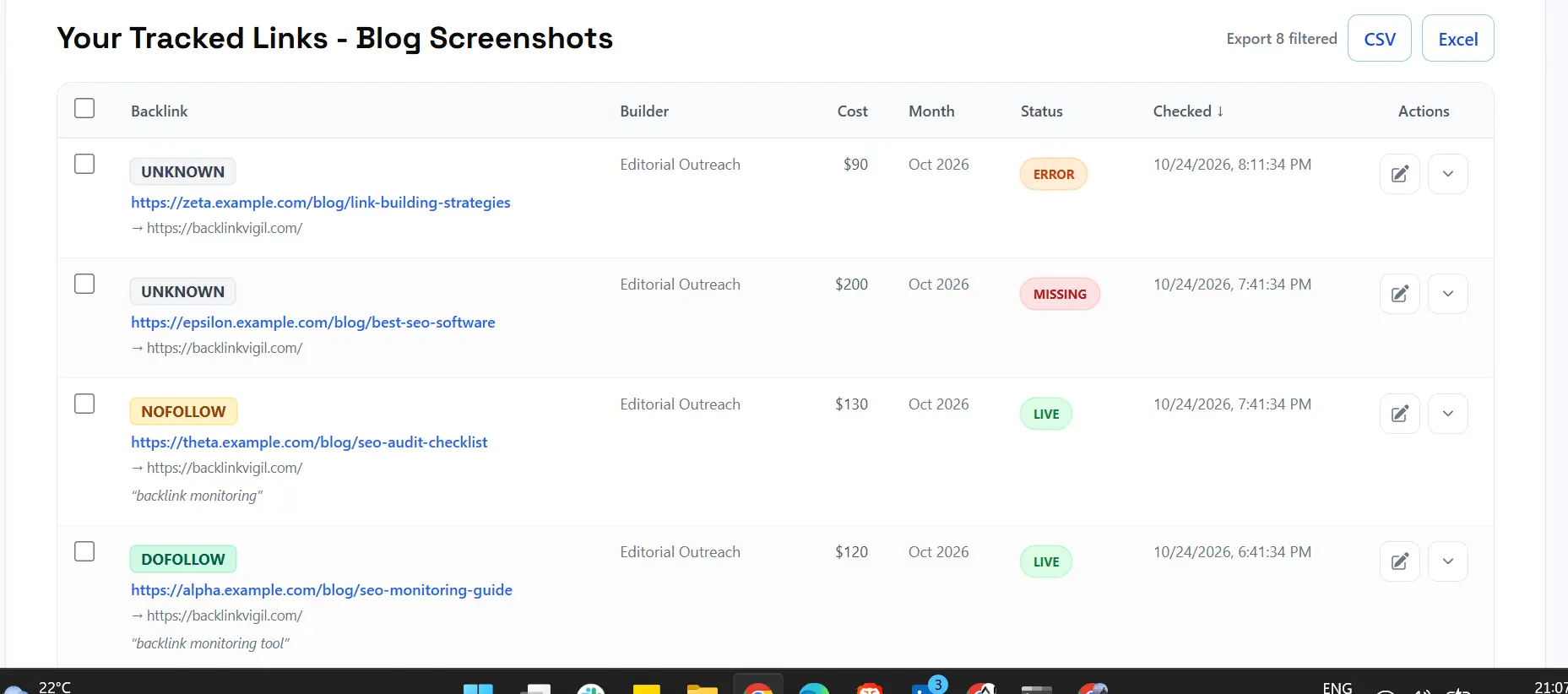
Backlink Vigil project dashboard showing an illustrative mix of live, missing, and unverified placements.
Step 2: Verify the initial placement
Open the linking page and locate the anchor. Confirm that its destination is correct. Inspect the HTML when necessary to check the href and rel attributes.
This initial verification is your baseline. Without it, a future checker may report a discrepancy but you won't know whether the placement ever matched the agreement. Preserve the original anchor, link attributes, and surrounding context where possible.
In Backlink Vigil, opening a backlink record reveals the latest known status alongside its link attributes, anchor, page context, and check history. This makes it easier to compare a publisher’s current page with the original placement.
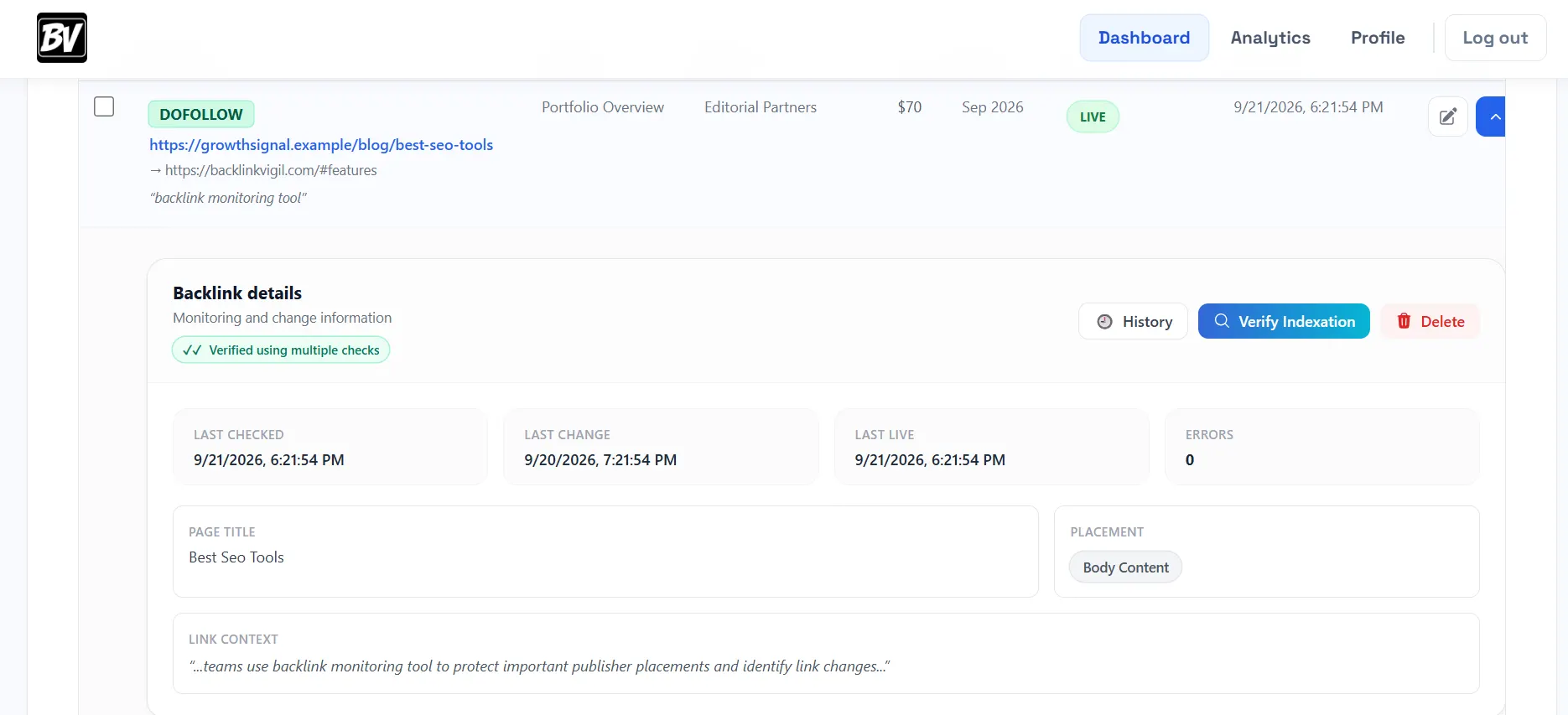
Backlink details panel: the evidence behind a monitored placement (illustrative records).
Step 3: Recheck on a consistent schedule
Daily checks are a practical choice for actively managed, acquired backlinks. They shorten the time between a publisher's change and your discovery of it. But daily monitoring is not real-time monitoring: a link removed just after a check may not be detected until the next scheduled visit.
Choose a schedule that matches your workload. The key is consistency, not an exaggerated promise of continuous crawling.
Step 4: Distinguish missing links from inaccessible pages
A crawler that cannot load a page has not necessarily proven that your backlink disappeared.
| Check result | What it actually tells you | Next step |
|---|---|---|
| Page loads and expected link exists | Placement is verified | Continue monitoring |
| Page loads but expected link is absent | Potential confirmed removal | Inspect and contact publisher if needed |
| Page returns 404 | The original page may be deleted or moved | Check redirects or a replacement URL |
| Page returns 403 or bot challenge | Automated access was blocked | Retry using another supported verification method |
| Timeout or temporary server error | Verification did not complete | Retry before reporting a lost backlink |
| Link exists but anchor or rel changed | Placement details differ from baseline | Review against the agreement |
This distinction is particularly important for sites protected by Cloudflare or pages that render content with JavaScript. A failed HTTP request is evidence of an access problem, not automatically evidence of link removal.
For example, if a publisher’s site is temporarily unreachable, the appropriate next step is to investigate or retry—not to tell a client that the publisher removed the link. Backlink Vigil distinguishes a confirmed missing placement from a check that could not reliably establish the result.
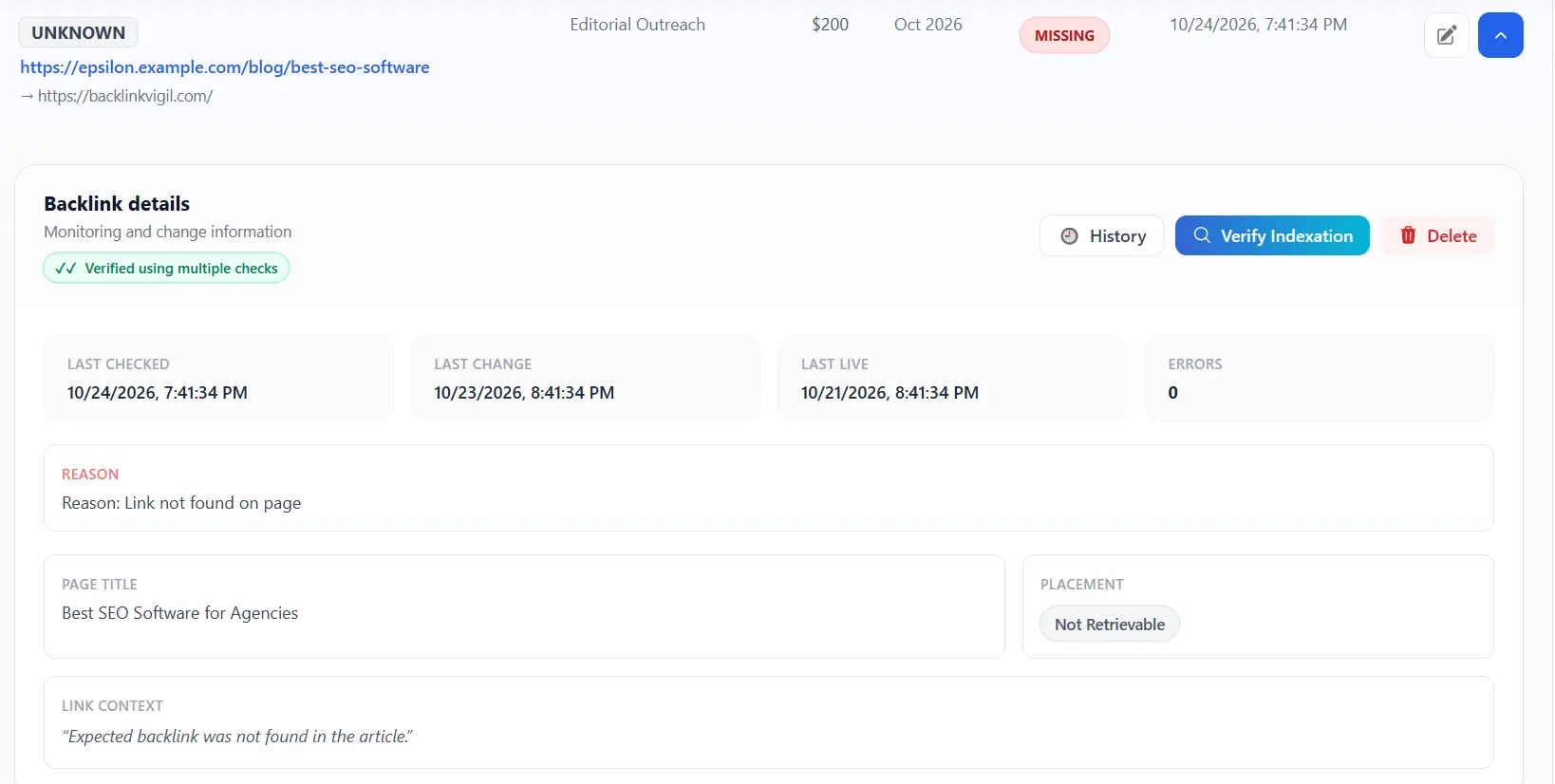
Confirmed missing placement: a different outcome from an inaccessible page.
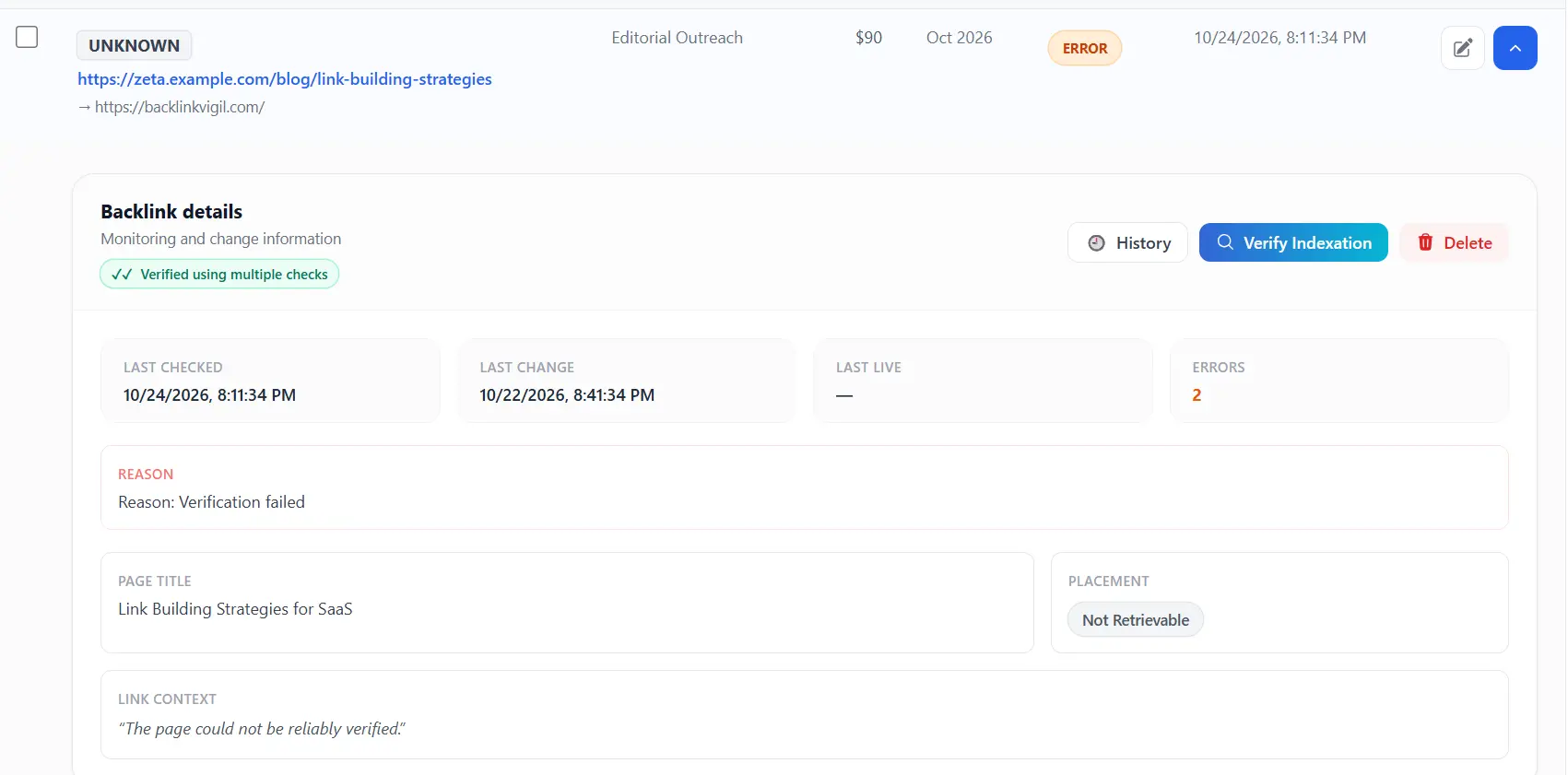
A failed check is shown as unverified rather than automatically classified as a lost backlink.
Step 5: Monitor changes beyond live or missing
A backlink can remain live while its value or agreed characteristics change. Review four categories:
Destination: Is the link still pointing to the agreed URL?
Anchor: Has the visible linked text changed?
Attributes: Was nofollow, sponsored, or ugc added or removed?
Placement context: Was the link moved from the article body to a less relevant location, or was surrounding text substantially edited?
Not every change requires intervention. A branded anchor replacing a keyword anchor may be acceptable in some campaigns. The point is to have the evidence needed to decide.
Link history also helps separate a one-off anomaly from a genuine change. When a check cannot confirm the link, the record can preserve the prior verified state and show why the latest result is uncertain.
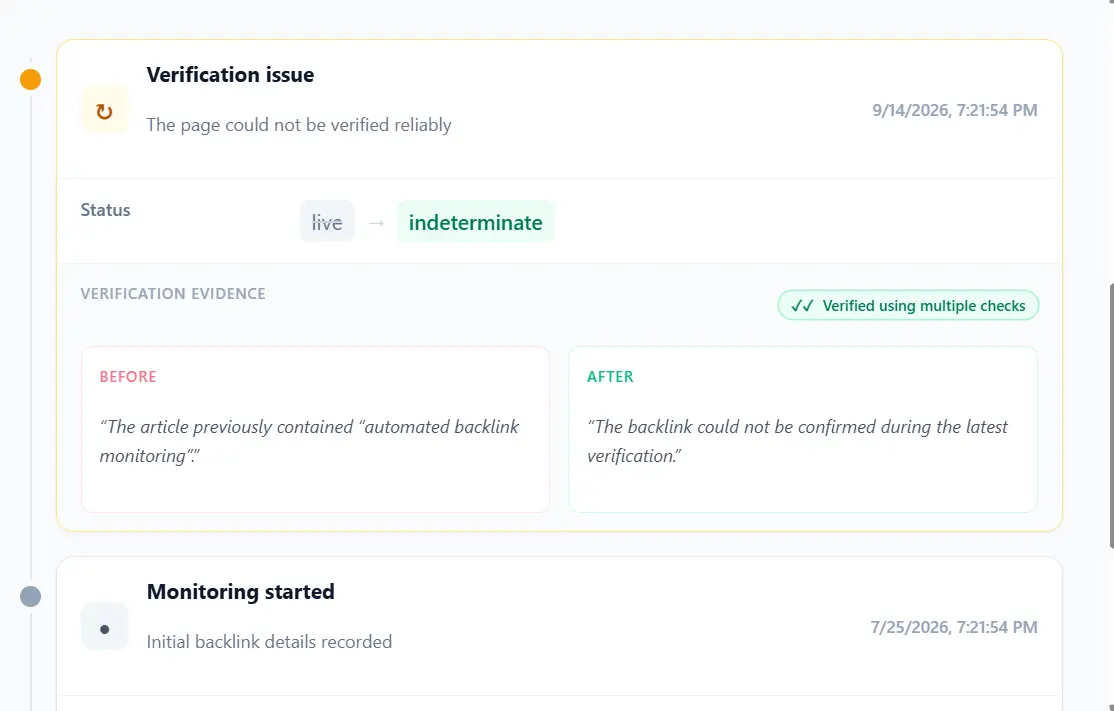
Link history showing an uncertain verification result and the earlier known state.
Step 6: Set up alerts and a review process
Alerts should direct attention to actionable changes, not create noise. A practical workflow is to review confirmed removals first, then attribute and anchor changes, then pages that need another verification attempt.
For an agency, assign an owner to each client or project. Record when you contacted the publisher and whether the placement was restored. Keep a history of detected changes so you can explain the timeline to clients.
Backlink Vigil sends change-based emails when meaningful changes are detected, rather than a routine email for every unchanged daily check. Pro teams can organize recipients by project and connect Slack for internal coordination. Its Monday weekly summary provides an additional review point, including issues and detected changes when present.
For a deeper look at notification priorities, read our guide to backlink alerts.
Manual monitoring versus a dedicated tool
Manual checking works for a handful of links. Open each page, search for the anchor, inspect the destination and attributes, and update a spreadsheet. The process becomes difficult when you have hundreds of placements across multiple clients.
A dedicated monitor can revisit known URLs, compare results with the baseline, and flag meaningful changes. Backlink Vigil is designed for this acquired-link workflow: daily checks, multi-step verification, change history, project organization, and change notifications. It is not a replacement for Ahrefs or Semrush when your goal is competitor backlink discovery.
A simple weekly monitoring routine
Even with automated daily checks, set aside time for a weekly review. Investigate confirmed missing placements, check unresolved access errors, review changed anchors and link attributes, and follow up with publishers on outstanding restoration requests.
For a SaaS founder, this can be part of reviewing an agency's monthly delivery report. For a link-building agency, it can be part of client quality assurance.
SaaS founder example: you outsource 20 editorial placements to an agency. Instead of treating a monthly spreadsheet as proof that every link still exists, keep the exact acquired URLs in a monitoring project. You can review confirmed losses, altered attributes, and the original anchor before discussing fixes with the agency.
SEO manager example: several link builders deliver placements across different product categories. Separate projects and builder fields let you review who delivered each link and identify which publishers require follow-up, without manually opening every article each week.
Agency example: use daily verification for operational exceptions and the weekly summary for account reviews. This reduces the chance that a missing placement goes unnoticed until a client asks about it.
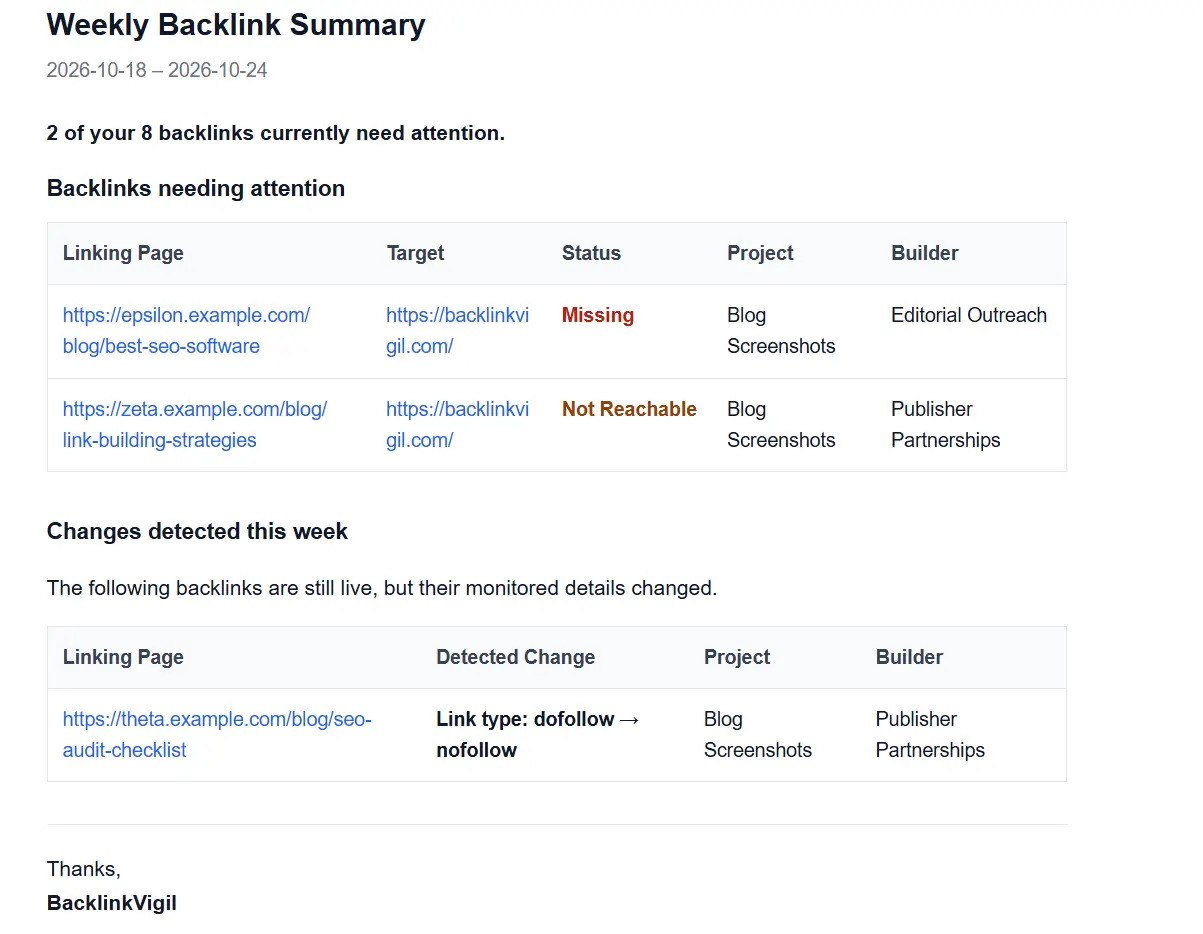
Illustrative weekly email: backlinks needing attention and changes detected during the week.
Frequently asked questions
How often should I check backlinks?
Daily checks are a reasonable starting point for acquired placements. The right interval depends on the importance of the links and your monitoring resources.
Can I monitor backlinks in Google Sheets?
You can maintain a placement list and update statuses manually in a sheet. Automated verification requires a script, service, or integration that fetches the linking pages and checks their links. A spreadsheet alone does not verify backlink status.
Does a 403 response mean my backlink is lost?
No. It means the request was forbidden or blocked. The page may still be accessible to visitors, so the backlink's status is not confirmed by that response alone.
Can a backlink be live but still need attention?
Yes. Its anchor, destination, rel attributes, or surrounding placement may have changed. See our dofollow and nofollow checking guide.
Final takeaway
Good backlink monitoring is not about collecting more SEO metrics. It is about maintaining a trustworthy record of the placements you worked to acquire, distinguishing real changes from failed checks, and knowing when to act.
Monitor acquired backlinks with Backlink Vigil. Keep track of daily checks, placement changes, and backlink history without manually revisiting every article.
Daily backlink checks, change history, and alerts for meaningful changes.
Explore Backlink Vigil →